sadyc's Zalenia planner
Forest
Clay
Ore
Lake
Lock / Unlock
Foresters Camp
Clay Pit
Ore Mine
Farm
Craftsman Hut
Lumberyard
Brickyard
Smelter
Mill
Bulldoze
See help (top right) on how to get your city from/to the game. Unsupported buildings will show up as a letter.
Total buildings:0
Craftsmens Huts:0
Forester's Camps:0
Clay Pits:0
Farms:0
Ore Mines:0
Lumberyards:0
Brickyards:0
Mills:0
Smelters:0
Forests:0
Clays:0
Lakes:0
Ores:0
Total Wood Output:0
Total Clay Output:0
Total Ore Output:0
Total Grain Output:0
CITY Output:0
Cell InfoPosition: None Type: None Resources Multi: 0 Huts Multi: 0 Refiner Multi: 0 Output: 0 Contribution: 0 |
OptimizerResources of interestDesired number of buildings Resource nodes
Constrains
|
|
Tools
|
Advanced
Weighting
Production Balance
Target:
—
—
Actual:
—
—
Deviation: —
Minimum huts
always keep this number of hutsOther useful tools:
Player score tracker
Troops matcher
×
To transfer your city to the game, use the export to clipboard button in the tool and then in game, in the planner, paste into the import section and click import layout.
Help & Guide
Welcome! This tool lets you design and optimize a resource-producing city for the game Zalenia.
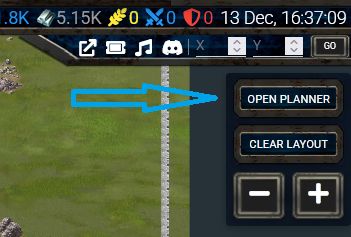
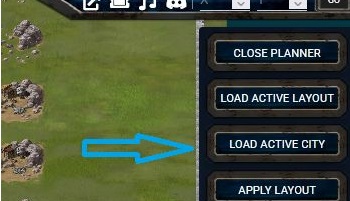
To transfer your city from the game, load it into the game city planner, export it and then use import button in this editor.
|
|

|
Main Features
- Toolbar: Click a building type to place it on the grid.
- Left panel: shows information about the city and its resources production.
- Right panel:
- shows production information for the selected building, including details about the boost it gets from nearby buildings and resources
- shows the gain in resource production if the building is upgraded
- shows how much production that building/resource is contributing to nearby buildings
- allows automatic building placement/removal.
- Heatmap: Colors the cells by production or contribution intensity showcasing how much they add to the total city production.
Automatic building placement/removal
- Use the Wood, Clay, Ore, Grain green buttons to toggle which resources you are targeting.
- Set the number of desired buildings.
- Use Add or Remove buttons to add/remove that many buildings optimizing for the targeting resources.
- Use Add huts and Remove huts buttons to add/remove a number of huts, also optimizing for the targeting resources.
- Override Resources toggle allows placing buildings over resource tiles.
- In the constraints panel on the right, weights for resources can be set or a certain minimum number of huts can be forced when adding buildings
Saving & Loading
Your city layout and toggle settings are automatically saved in your browser. When you reload, your city is restored exactly as you left it.
Additionaly you can import and export your city to clipboard to be used from/in the game.
Building Overview
Each building production is boosted by nearby resource tiles (forests, lakes, clay, ore) and nerby buildings:| Building | Produces | Benefits From | Synergy |
|---|---|---|---|
| Forester | Wood | Adjacent Forests | Lumberyard (+105%) |
| Clay Pit | Clay | Nearby Clay Tiles | Brickyard (+105%) |
| Ore Mine | Ore | Adjacent Ore Tiles | Smelter (+105%) |
| Farm | Grain | Lakes & Fields | Mill (+105%) |
| Craftsman's Hut | Nearby Producers | +42% Bonus Each |
- Each resource neighbor adds +55% for the first, then +40% for each additional.
- Each Craftsman adds +42% to nearby producers.
- Processing buildings (Brickyard, Smelter, Lumberyard, Mill) give +105%; only one counts per producer.
- Farms gain +40% per nearby Field and +55% per Lake.
Tips for Optimization
- Place producers close to matching resources.
- Use Craftsmen to boost nearby buildings.
- Place processing buildings near clusters of producers.
- Try the Add button for automatic placement optimizing (as much as possible) for best production.
Weighting
- Toggle “Use weighting” to target desired balance between the output for various resource types.
- Adjust Wood / Clay / Ore values to set your desired production ratio.
- When weighting is enabled, the optimizer aims to match total output ratios to these targets.
- The Production Balance bar shows how close your city is to your target ratios (green = balanced, red = off).
Happy city planning!